Home Blog

Is Your Next Car a Game Console? Inside the Rise of In-Car Gaming

0
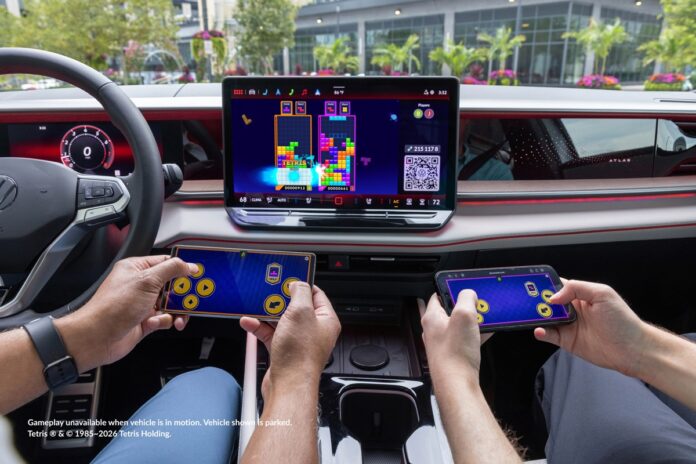
Two people playing Tetris with AirConsole In-Car Gaming in a Volkswagen Atlas

For years, in-car gaming was a party trick for luxury cars and Teslas. That is changing. On September 23, 2026, Volkswagen of America announced that it will offer AirConsole in-vehicle gaming on six model-year 2027 vehicles. That makes it the first volume automotive brand in the U.S. to offer the platform.

The announcement matters beyond America. It shows that playing games on your car’s infotainment screen is moving from premium brands to everyday family cars. Here is what Volkswagen is launching, how in-car gaming works, and why carmakers around the world suddenly want to turn your dashboard into a games console.

What Volkswagen Just Announced

AirConsole will be available on the 2027 Volkswagen Atlas, Atlas Cross Sport, Tiguan, Golf GTI, Golf R and ID. Buzz. The platform launches with 20 games, including PAC-MAN Championship Edition, UNO Car Party! and Tetris. Tetris is making its North American debut as an in-car game through this partnership.

Volkswagen is also adding content you won’t find anywhere else. A custom version of PAC-MAN replaces the power pellets with Volkswagen logos and the bonus fruits with Volkswagen vehicles. Golazo! and Memory Match also get Volkswagen-branded content. On compatible models and trims, select games will make the cabin’s ambient lighting react to what is happening on screen.

N-Dream CEO Anthony Cliquot framed the launch around scale. He noted that

“North America is the world’s largest gaming market.”

How AirConsole Works: Your Phone Is the Controller

AirConsole’s big selling point is simplicity. There is no gamepad to buy and no console to install. The game runs on the car’s infotainment display, and each passenger scans a QR code on the screen with their smartphone. The phone then becomes a controller, so several people can play together at once.

There is one firm rule: the car must be parked. Volkswagen stresses that gameplay only works when the vehicle is stationary. That keeps the feature away from drivers while they are on the road.

A Brief History of In-Car Gaming

Volkswagen is not the first carmaker to put games in a car. Tesla popularized the idea. Tesla added an Atari emulator through an over-the-air update in 2018, then launched its Tesla Arcade platform in 2019. In 2021, it fitted the Model S and Model X with AMD graphics hardware capable of up to 10 teraflops, and Steam integration followed the next year.

Tesla has since reportedly begun phasing out Steam on new Model S and Model X cars, though owners of cars that already support it can still play their existing games.

Other brands took different approaches:

  • Cloud gaming: Nvidia announced ahead of CES 2023 that its GeForce Now cloud gaming service was coming to select Hyundai, BYD and Polestar electric vehicles, its first expansion beyond phones, smart TVs and computers.
  • Casual and retro games: Mercedes offered Angry Birds on its infotainment screen in 2023 and later partnered with retro streaming service Antstream Arcade.
  • Phone-as-controller multiplayer: BMW offers AirConsole games through its Digital Premium package on models running BMW Operating System 9, and covers the data usage.

Volkswagen’s U.S. rollout also has a European precedent. VW began launching AirConsole in Europe in mid-September 2024, with the same requirement that the car be in park.

Related: Tesla Cybercab Is Now Picking Up Paying Passengers in Austin

Who Makes AirConsole?

AirConsole is developed by N-Dream, a company based in Zurich, Switzerland. It entered the automotive market in 2022, and within three years it was running in BMW, MINI, Volkswagen, Audi and Porsche vehicles, with more brands planned. The Volkswagen press release also lists Škoda and Tata among its partners.

In October 2025, Indian software company KPIT Technologies took control of N-Dream. KPIT raised its stake to 88.9% in a deal worth EUR 16.35 million. KPIT has said it will back N-Dream’s plans to expand beyond gaming into broader in-cabin digital experiences. That signals where this technology is heading: games are the starting point, not the end goal.

Why Carmakers Suddenly Care About Games

Games might seem like an odd priority for companies that build cars. But four trends make in-car gaming a logical bet.

1. EV charging creates downtime: Filling a petrol tank takes minutes. Charging an electric car can take much longer. Brands are competing to keep occupants engaged, especially during the growing dwell times that come with EV charging.

2. Cars are becoming software platforms: Modern vehicles receive over-the-air updates and run app-like services. Automakers are investing in software-defined vehicles in the hope of finding revenue beyond building, selling, and financing cars.

3. Subscriptions bring recurring revenue: Volkswagen’s AirConsole sits inside In-Vehicle Premium, its connected services package. Industry observers see it as part of a wider push by carmakers to get more value from infotainment systems and connected subscriptions.

4. Brand loyalty. Branded content like Volkswagen’s custom PAC-MAN turns the car into a brand experience. The underlying bet is that people who enjoy spending time in their car are more likely to stay loyal to the brand.

The Catch: Subscriptions and Parked-Only Play

In-car gaming is not free forever. Volkswagen’s MY27 Atlas, Atlas Cross Sport, Tiguan and Golf models include three months of In-Vehicle Premium at no extra cost, while the ID. Buzz gets one year. After that, owners need an active subscription at $149 per year to keep AirConsole and the other connected features, which include a Wi-Fi hotspot, Premium Navigation and Premium Speech.

To play, owners must enroll an eligible vehicle in the myVW app and accept the terms and conditions. They also need a compatible infotainment system, vehicle connectivity and a compatible smartphone. Game availability and features are managed by N-Dream and may change over time.

Critics have raised the obvious question: is the fun worth an ongoing fee when free entertainment is already available on everyone’s phone? The answer will likely depend on whether buyers value the bundle as a whole, not just the games.

Is In-Car Gaming Coming to Your Market?

Volkswagen’s announcement covers the United States, but AirConsole already runs in Volkswagen Group and BMW vehicles in Europe. With Tata listed as a partner and N-Dream now owned by an Indian company, expansion into more markets looks likely.

However, availability, pricing and the game catalog depend on the carmaker and the region. Buyers outside the U.S. should check with their local dealer before assuming a model includes gaming.

Conclusion

In-car gaming is no longer a novelty reserved for Teslas and luxury cars. Volkswagen’s move shows that mainstream carmakers now see the infotainment screen as an entertainment platform, not just a map and a radio. Smartphone controllers keep the setup simple, parked-only rules address safety, and longer EV charging stops give people a reason to play. The open question is whether buyers will pay a yearly subscription for it.

Frequently Asked Questions

What is in-car gaming?
In-car gaming lets occupants play video games on a vehicle’s infotainment screen. Depending on the carmaker, games are controlled with smartphones, touchscreens, dedicated controllers or even the steering wheel.

Which Volkswagen models get AirConsole?
In the U.S., AirConsole is available on the 2027 Atlas, Atlas Cross Sport, Tiguan, Golf GTI, Golf R and ID. Buzz when enrolled in In-Vehicle Premium through the myVW app.

Can you play AirConsole games while driving?
No. Volkswagen’s AirConsole only works while the vehicle is parked.

How much does Volkswagen’s in-car gaming cost?
It comes with a free trial of In-Vehicle Premium: three months on most eligible MY27 models and one year on the ID. Buzz. After that, the subscription costs $149 per year.

Which other carmakers offer in-car gaming?
AirConsole is also available from brands including BMW, MINI, Audi and Porsche. Tesla offers games through Tesla Arcade, and Nvidia has partnered with Hyundai, BYD and Polestar to bring GeForce Now cloud gaming to cars.
Noble Study: Four Offsite Mentions Is the Threshold Where AI Visibility Stops Fading

0
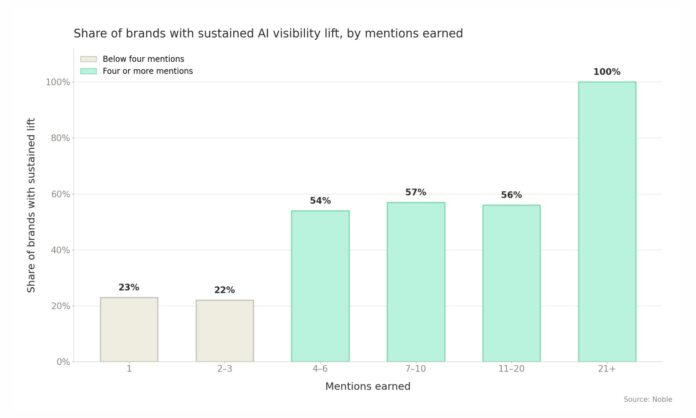
Bar chart of brand AI visibility lift

Most brands treat getting cited by ChatGPT, Perplexity, and Google’s AI answers as a matter of luck. New research suggests it is closer to a counting problem, and the number is four.

Noble, a San Francisco-based platform that places brand mentions in the third-party sources AI models cite, published findings on August 31, 2026 identifying a threshold at which AI search visibility starts to stick rather than fade. The study analysed 599 brand mentions across 79 companies over an 18-week window, using live placements tracked from January to May 2026.

The headline result: only about a quarter of brands with one to three mentions kept their visibility gains through the study window. Once a brand reached four or more mentions, that share more than doubled.

What the research measured

Noble tracked whether brands appeared in AI-generated answers before and after offsite mentions went live, then checked whether any gains lasted through the end of the window. The distinction matters: a brand can surface in AI answers for a week and vanish again, which registers as a lift but not a durable one.

The study also ran a control group of 41 brands with no placements at all. The pattern held against that baseline, which is what separates this from the before-and-after case studies that dominate the AI search marketing space.

Noble puts the odds of the four-mention difference appearing by chance at roughly three in 1,000. The company describes the work as a preliminary look at the pattern rather than a settled finding.

The curve flattens after four

The more surprising number sits past the threshold. From four mentions through 20, the sustained-lift rate stayed in the mid-50s and did not climb further.

In other words, mentions five through twenty did not buy additional visibility. According to Noble’s Head of Content, Delia Rowland, they buy retention instead, sources can drop out of an engine’s rotation, and large language models tend to favour fresher material, so continued placement protects a position rather than extending it.

“Four gets you in. It doesn’t keep you there,”

Rowland said.

That framing has direct budget implications. A brand spending toward twenty placements expecting a linear climb in AI answer presence is, on this data, paying for insurance rather than growth.

Two client campaigns show the same shape

Noble pointed to two published client campaigns that follow the pattern.

The ABM Agency, an account-based marketing firm, registered no presence in AI answers through most of its 12 placements. Presence then jumped to roughly 12% within a single week in May 2026 and held at that level.

Zip, a $2.2 billion procurement platform trailing Coupa, SAP Ariba and Procurify in its category, moved from 29% to 52% presence in AI answers after 14 placements. Its share of voice rose from 11.2% to 19.1%, overtaking Procurify to reach third place in the category.

Both curves share a shape that will be familiar to anyone who has run a link-building or digital PR campaign: a long flat stretch that looks like failure, then a step change.

Why there is a two-to-three week lag

Rowland said the delay between placements going live and visibility shifting runs consistently across Noble’s client base at roughly two to three weeks, as models take time to discover a new source and treat it as trustworthy.

This is the practical detail most likely to change how teams operate. A campaign measured at day 10 will look like a failure. Programmes killed at the four-week mark may be killed one week after they started working.

The onsite-versus-offsite argument

The findings cut against how many marketing teams currently allocate AI visibility budgets, which lean heavily toward on-site work: structured data, schema markup, llms.txt files, FAQ blocks and content restructuring aimed at making a site easier for models to parse.

Rowland’s contention is that the most common misconception is assuming on-site content alone is enough to earn a citation, and that offsite is the lever most brands overlook.

It is worth stating the obvious caveat plainly: Noble sells offsite placements, and the research validates the service Noble sells. That does not make the numbers wrong — the control group and the significance testing are more rigour than most vendor research bothers with — but it does mean the study should be read as one input rather than as neutral evidence. Independent replication does not yet exist.

What this means for marketing teams

Four practical takeaways for anyone running generative engine optimization (GEO) or answer engine optimization (AEO) work:

  1. Plan in blocks of four, not one-offs. A single placement in a high-authority publication is, on this data, unlikely to produce a gain that survives.
  2. Do not measure before week three. Set the first checkpoint at 21 days minimum, and the real read at six weeks.
  3. Budget the back half as maintenance. Placements beyond the fourth are best justified as defending a position, not as buying incremental presence.
  4. Do not abandon on-site work. The study compares brands with and without placements; it does not test placements against on-site optimisation. Treating it as evidence that schema and site structure do not matter overreads the data.

Full methodology and both case studies are published on Noble’s resources page at thatsnoble.com/resources.

FAQ

How many brand mentions does it take to appear in AI search results? Noble’s research points to four offsite mentions as the threshold at which visibility gains hold. Below four, roughly a quarter of brands retained their gains; at four or more, that figure more than doubled.

How long does it take to get cited by ChatGPT or other AI models? Noble reports a consistent lag of about two to three weeks between a placement going live and visibility shifting, as models find and begin trusting the new source.

Do more mentions mean more AI visibility? Not beyond a point. Between four and twenty mentions, the sustained-lift rate stayed in the mid-50s without rising further. Additional placements appeared to protect the existing gain rather than grow it.

Is on-site AI optimisation still worth doing? The study does not test on-site work against offsite placements, so it offers no evidence either way. It compares brands with placements to a control group of 41 brands without them.

Who conducted the research? Noble, an offsite placement platform, published the study on August 31, 2026, through Newsfile. Because Noble sells the service the research supports, the findings warrant the same scrutiny as any vendor-published study.

MAKERphone 2.0 Launches on Kickstarter: a Real 4G Phone You Build in Two Hours and Code with AI

0
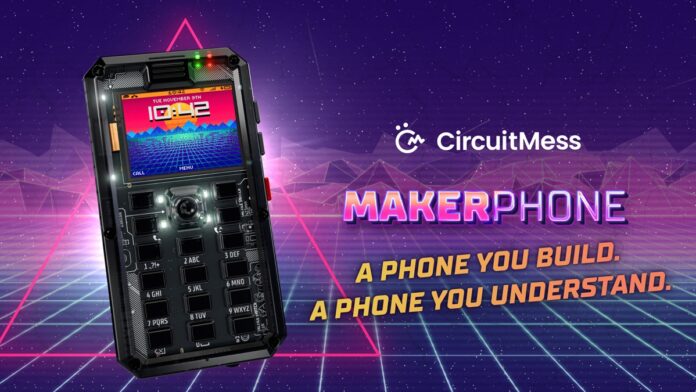
MAKERphone 2.0 from CircuitMess

CircuitMess has launched MAKERphone 2.0 on Kickstarter, and the campaign is already more than nine times funded with three weeks still to run. The pitch is unusual enough to explain the response. This is a real 4G mobile phone that arrives in a box of parts. You assemble it yourself in about two hours, slot in a nano-SIM, and it makes calls and sends texts on live cellular networks. Then you program it, starting by describing what you want in plain English.

The campaign went live on 10 September 2026 with a $30,000 goal. According to Croatian tech outlet Bug.hr, that goal was met in the first 49 minutes and cleared five times over within a day. Kickstarter’s own campaign page now shows the project is past 900 percent of target, with roughly 25 days left before it closes in mid-October.

This sequel is eight years in the making. The original MAKERphone, later known as Ringo, raised over $324,000 in 2018 from 2,154 backers and shipped to more than 6,000 people, but it asked each of them to spend about seven hours with a soldering iron.

No soldering: the change that matters most

The single biggest difference in version 2.0 is that the soldering iron is gone.

Every component now clicks, screws or plugs into place. CircuitMess supplies a LEGO-style illustrated manual plus video guides, and puts the full build at roughly two hours with no prior experience needed. The kit contains everything: PCB, display, 12-key numpad, joystick, battery, casing and the remaining hardware.

That drop from seven hours of soldering to two hours of assembly is what turns the MAKERphone from a maker project into something a nine-year-old can finish on a Saturday afternoon, which is precisely the audience CircuitMess is chasing this time.

MAKERphone 2.0 Specs

ComponentSpecification
ProcessorESP32-S3, dual-core, 4 MB flash, 4 MB PSRAM
Cellular4G LTE Cat-1 with 2G fallback, nano-SIM
Display1.77-inch colour, 160 × 128 pixels
Input12-key numpad, navigation joystick, 4 function keys, power key, volume rocker
AudioDAC and speaker, I²S microphone, 3.5 mm headphone jack
Battery1,000 mAh, USB-C charging
StoragemicroSD card slot
ConnectivityWiFi, Bluetooth, USB (charging and programming over one cable)
ExpansionUMAX modular connector, six add-on modules, auto-detected
ExtrasProgrammable RGB LEDs, real-time clock
Dimensions11.5 × 6 × 1.8 cm
Weight104 g assembled

The ESP32-S3 at the center of it is an Arduino-compatible microcontroller, not a smartphone chip, and CircuitMess is not pretending otherwise. Keeping the headphone jack in 2026 is a deliberate wink at the audience.

Out of the box the assembled phone handles calls, SMS, contacts, call history, ringtones, alarms, calendar, notes, a music player with playlists, a photo and video gallery, a file explorer and more than 10 built-in retro games.

A man using a MAKERphone 2.0 mobile phone.

Six snap-on modules that add their own apps

The UMAX expansion port takes six add-on modules: Camera, Big Speaker, Flashlight, Environment (temperature and humidity), Infrared, and a DIY Perf Board for soldering your own circuits if you want to go further.

Plug one in, and the phone detects it automatically, then adds the matching app to the menu without any setup. The base kit doesn’t include any modules; they are sold separately.

VibeBoy: coding that starts in plain English

The software side is where MAKERphone 2.0 makes its boldest claim. Programming happens through VibeBoy, CircuitMess’s AI-assisted coding studio, available at vibeboy.com.

You describe an idea in plain English; the company’s own example is “make me a game where a taco dodges falling pickles.” Watch AI generate the code, then push it to the phone in one click. From there, you are expected to open that code, learn to read it, fix what is broken, and eventually write your own.

CircuitMess structures this as a four-rung ladder: Pixel Rookie (ages 9+), Signal Hacker (11+), Modder (14+) and Vibe Coder (any age), ending with writing MicroPython and Arduino C++ from a blank file.

“VibeBoy is not autocomplete,” the company insists in its press materials, framing it as a tool that teaches users to think with AI rather than outsource to it, how to describe a problem, read what the model produced, and correct it when it is wrong.

Every MAKERphone 2.0 includes three months of unlimited VibeBoy AI usage and a free tier for life. The Pro tier costs $4.99 a month afterwards.

A first phone with no app store

CircuitMess is pitching MAKERphone 2.0 hard at parents, and the positioning is sharp: a phone that calls and texts the people a child needs, with no social media, no app store, and no infinite feed. When a kid wants a new app, they build it.

The company’s line for it is that MAKERphone 2.0 doesn’t fight screen time; it turns it into create time.

That lands at a useful moment. Governments across Australia, France, the UK, and several US states have moved to restrict phones in schools and tighten social media age limits, and the minimalist phone category- Light Phone, Punkt, Pinwheel, the Nokia feature phone revival has grown on exactly that anxiety.

MAKERphone 2.0 arrives at the same problem from the opposite direction: instead of selling subtraction, it sells construction.

There is a companion device too. The optional MAKERband is a buildable, programmable smartwatch running an ESP32-C3 with a 0.96-inch colour display, 15 watchfaces, five mini-games and phone notifications. It pairs over Bluetooth 5.0 with the MAKERphone, but also with iOS and Android. Schools get a Classroom Pack: 10 phones, 10 MAKERbands and 10 module packs.

MAKERphone 2.0 price and release date

CircuitMess lists early-bird pricing from $109 in its press materials, with reporting from It’s FOSS putting the earliest tiers at $119 and an eventual retail price of $169. Tiers climb from there depending on bundle, and the cheapest ones typically sell out early on campaigns like this.

Shipping is worldwide. Backer deliveries are estimated for Q3 2027, about a year after the campaign closes, with general retail availability after backers are fulfilled.

That wait is the main thing to weigh. The counterweight is CircuitMess’s record: founded in Karlovac, Croatia in 2017 by Albert Gajšak, the company has shipped more than 300,000 kits to customers in over 100 countries, developed 37 products, and raised over $2.2 million across six previous Kickstarter campaigns every one of them delivered. That is a materially better track record than most hardware crowdfunding, though it is never a guarantee.

CircuitMess also says this is not a prototype pitch. The hardware design is finished and final production hardware exists; the software is feature-complete and in final testing. The money raised funds manufacturing at scale rather than R&D.

“The original MAKERphone taught thousands of kids that a phone isn’t magic, it’s parts and code, and both can be mastered,”

said Albert Gajšak, founder and CEO of CircuitMess.

“MAKERphone 2.0 takes away everything that used to stand in the way.”

Should you back it?

MAKERphone 2.0 is not competing with a smartphone, and buying it as one would be a mistake. A 160 × 128 display and 4 MB of flash set hard limits on what it can do.

What it is competing with is a STEM kit, a coding course, and a locked-down kids’ phone all three at once for roughly the price of one. If that combination appeals, and an 18-month wait from today does not put you off, the early-bird tiers are the cheapest this will ever be.

The campaign runs until mid-October on Kickstarter.

MAKERphone 2.0 FAQ

Is MAKERphone 2.0 a real phone? Yes. It takes a nano-SIM and makes voice calls and sends SMS over 4G LTE Cat-1 networks, with 2G fallback where LTE is unavailable.

Do I need to know how to solder? No. Every part clicks, screws or plugs together. Assembly takes around two hours with an illustrated manual and video guides. Only the optional DIY Perf Board module involves soldering.

What age is MAKERphone 2.0 for? CircuitMess sets the floor at 9+ for the entry-level Pixel Rookie tier, with the learning ladder running up through 11+, 14+ and an open-ended top level for adults.

What languages can you program it in? Plain English through VibeBoy’s AI studio, then MicroPython and Arduino C++ directly.

How much does MAKERphone 2.0 cost? Early-bird pledges start at $109 according to CircuitMess, with reported entry tiers at $119 and an expected retail price of $169 after the campaign.

When will MAKERphone 2.0 ship? Backer deliveries are estimated for Q3 2027. Retail availability follows backer fulfilment.

Does it run Android apps? No. It runs CircuitMess’s own firmware on an ESP32-S3 microcontroller. There is no app store — you write the apps yourself.

AI HR and Payroll Agents Are Coming for Lean Teams and Deskless Workers. What Could They Mean for Nigerian and African Businesses?

0
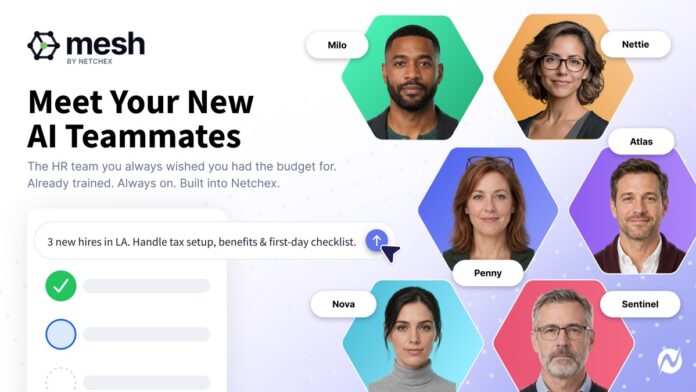
AI HR for Deskless Workforce

When a US payroll company launched a team of AI “HR teammates” in July 2026, it didn’t obviously sound like a Nigerian story. Netchex’s Mesh, six named HR agents that chase timecards, file leave, and flag compliance gaps before anyone asks, was built for American restaurants, hotels, and dealerships.

But look past the flags and the product fits Lagos as neatly as it fits Louisiana. The businesses Mesh targets are lean operations where most staff never sit at a desk, and one overworked admin runs payroll, scheduling, and onboarding, which describes a huge share of the African economy. And while Mesh itself isn’t available here, the model behind it is already arriving, with some of it built by Nigerians for Nigeria.

Here’s what the shift toward AI HR agents could mean for businesses across Nigeria and the continent, and where the honest limits still are.

Why HR AI Agents fits Africa’s Deskless Workforce

Global HR software was overwhelmingly designed for the corporate office. That’s a poor fit for a continent where work mostly happens on the floor, in the field, and on the front lines: factory workers in Ethiopia, retail staff in Kenya, construction crews, and restaurant workers in Nigeria.

The structural problem is the same one Mesh was built for. Across Africa, HR technology adoption has often happened in fragments: payroll runs in one system, recruitment in another, leave tracking lives in spreadsheets, and employee questions bounce between WhatsApp and email.

In 2026, that fragmentation is starting to feel expensive not just in money, but in time, risk, and compliance exposure as tax authorities tighten digital reporting and enforcement.

An AI agent that watches across pay, time, and people data and acts on what it sees is aimed squarely at that fragmentation. This is the local face of a broader move across enterprise tech. The shift from AI that answers questions to AI that quietly does the work.

The local players are already here

This is what makes the story concrete. You don’t need to wait for a US product to see what agentic HR looks like in Nigeria; homegrown solutions already exist.

SeamlessHR (Seamless Technologies)

This is Nigeria’s best-known HR and payroll company and the clearest local parallel; it moved in the same direction as Mesh in July 2026, rebranding as Seamless Technologies to reflect a push into AI and financial services.

The group now runs an AI layer called Samira, designed to automate tasks and generate insights across its platform, alongside BWOP (Blue Collar Operations Platform), a product built specifically for organizations managing frontline and shift-based staff, digitizing attendance, payroll, records, and employee self-service “regardless of where work happens.”

Founded in 2018 out of the CEO’s living room in Lagos, it now serves close to 2,000 organizations across several African markets and has raised over $20 million to date, including a $10 million Series A led by TLcom Capital.

Its payroll product automates PAYE and statutory compliance with a full audit trail, and its embedded-finance arm, Breeze, adds earned-wage access and payroll financing, a fusion of HR tech and fintech the US market has largely left alone.

Jem HR

Jem HR is a South African platform built specifically for deskless workers. It raised $8.4 million in a Series A in August 2026 to scale across the continent, explicitly pairing workforce management with AI.

Bloomberg named it one of its top African startups to watch in 2026 and the only one on the list built specifically for deskless workers. There are roughly 2.3 billion deskless workers globally, and Jem’s whole thesis is that almost none of the world’s HR software was built for them.

And beyond dedicated platforms, a wave of Nigerian AI agencies is building WhatsApp-based automations for HR, payroll, and compliance, CV scoring, PAYE breakdowns, and leave approvals over chat for SMEs that would never buy enterprise software.

What businesses actually stand to gain

The appeal for a lean African HR team is the same one Netchex pitches, minus the marketing gloss.

The clearest win is time. An April 2026 field study cited by African tech observers found that SMEs using AI agents for admin work like follow-ups and coordination reported 30–50% time savings on administrative tasks, freeing owners and managers to focus on growth rather than paperwork. For a business where the “HR department” is one person juggling ten roles, that is not a marginal gain.

The second is compliance, which is where the stakes are highest locally. Nigerian payroll carries real statutory complexity: PAYE, pension, NHF, and penalties for incorrect filings. An agent that watches the statutory calendar and catches an anomaly before a deadline passes is doing exactly the kind of work that’s easy to drop when you’re busy and expensive to get wrong.

The third is that these tools meet workers where they already are. The West’s HR portals assume a desktop and a company laptop. Africa’s reality is mobile-first: WhatsApp is the de facto business tool, with over 100 million users on the continent, and the agents built here reflect that by running leave requests and payslip queries through the apps people already have open.

The honest caveats

None of this is a clean win, and it would be a disservice to pretend otherwise.

Mesh itself isn’t available here: Netchex is a US-focused product built around US payroll and compliance. Nigerian and African businesses will mostly be served by local or Africa-focused tools that understand naira, PAYE, pension rules, and local languages, not by importing an American platform.

The adoption gap is real: Nigeria ranks sixth globally for individual AI literacy on one 2026 index, but its enterprises score far lower on actual deployment, around 34 out of 100, one of the widest gaps between workforce skill and institutional adoption recorded anywhere. The talent to use these tools is ahead of the organizations putting them to work.

The infrastructure and governance constraints bite harder here: Patchy connectivity, data-quality problems, skills shortages, and evolving data-protection regulation (Nigeria’s NDPA and equivalents across the continent) all raise the difficulty of running autonomous software safely.

The same global caution applies too. Analysts expect a large share of agentic AI projects worldwide to be canceled by 2027, usually because of weak governance and unclear value rather than bad technology. African deployments are no exception.

Cost and trust matter: Building a capable AI WhatsApp system in Nigeria can cost millions of naira upfront, and a lean business needs to see a fast payback. Handing statutory, money-moving tasks to software requires trust that has to be earned, which is exactly why the “human approval before anything sensitive” model that Mesh uses is the right default.

The bottom line

The Netchex launch is a US story, but the pattern it represents is landing in Nigeria on its own terms. The businesses that dominate African employment small, lean, frontline, mobile-first are arguably a better fit for AI HR agents than the corporate offices these tools were first pitched to.

The near-term opportunity isn’t buying Mesh. It’s watching what local players like Seamless Technologies and Jem do with the same idea, and for any business owner drowning in payroll prep and compliance deadlines, starting to ask which of those hundred small tasks could safely be handed to an agent that acts, while a human keeps hold of the decisions that count.

Parallels Desktop 27 Drops Intel Macs: What It Means for Intel Mac Owners

0
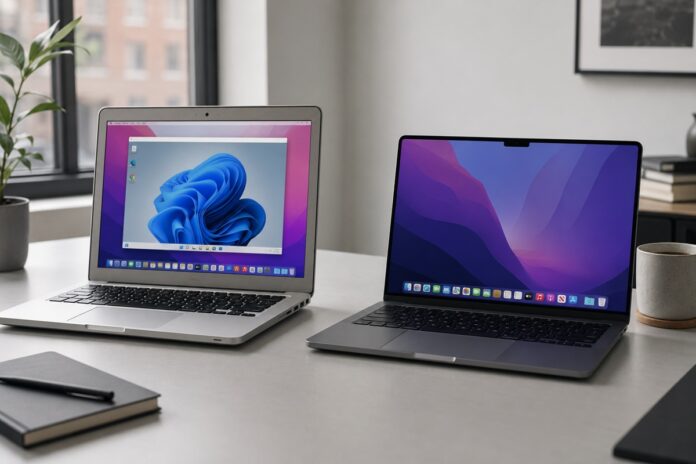
Two laptops on a desk

Parallels Desktop 27 is here, but for many Mac users, the biggest news isn’t a new feature; it’s a line that’s finally been drawn. Version 27 runs exclusively on Apple Silicon Macs. If your Mac still has an Intel processor, you can’t upgrade to it.

That change doesn’t stand alone. It arrives in the same season as macOS 27 “Golden Gate,” Apple’s first desktop release that completely leaves Intel Macs behind. Together, the two mark the effective end of the Intel Mac era. Here’s exactly what that means if you rely on your Mac to run Windows and what you should do about it.

Related: Parallels Desktop 27 Standard vs Pro: Which to Buy?

What actually changed in Parallels Desktop 27

Parallels Desktop 27 is available only for Apple Silicon Macs, the M1 through M5 generations. There is no Intel build.

If you’re on an Intel Mac, the situation is straightforward: Parallels Desktop 26 is the last version that supports your hardware.

It doesn’t stop working the day Desktop 27 ships, and you can keep running your existing Windows virtual machines on it. But you won’t receive the version 27 feature set, and over time you should expect version 26 to move toward the end of its support lifecycle.

Parallels maintains a knowledge base article with the current lifecycle details, which is worth bookmarking if you’re staying on Intel for now.

Get 45% Off Desktop 27

Why this was expected: macOS 27 also leaves Intel behind

The Parallels cutoff mirrors a much bigger one from Apple. macOS 27 Golden Gate is the first version of macOS that will not install on any Intel Mac; it requires an Apple Silicon chip (M1 or later).

This isn’t a surprise. Apple signaled back at WWDC 2025 that macOS 26 Tahoe would be the final release compatible with Intel-based Macs, and Golden Gate is that transition reaching completion rather than a sudden reversal. In practical terms, an Intel Mac tops out at macOS 26 Tahoe, and a Mac that can’t move past Tahoe also can’t run the Parallels release built for the newest macOS.

Your Intel Mac still works

None of this bricks your machine. An Intel Mac running macOS 26 Tahoe and Parallels Desktop 26 remains a fully functional way to run Windows on a Mac today.

Apple has also confirmed that Intel Macs will continue to receive security updates for roughly three years after their final supported macOS release. So you won’t be left exposed the moment Golden Gate ships; you’ll have a defined runway.

What you won’t get are new macOS features, the newest Apple Intelligence capabilities, and the performance and graphics improvements Parallels is now reserving for Apple Silicon.

The other deadline: Rosetta 2 and Intel apps

There’s a second, easily confused deadline that even Apple Silicon owners should note. macOS 27 Golden Gate is the last version of macOS to fully support Rosetta 2, the translation layer that lets Intel-built apps run on Apple Silicon Macs.

When macOS 28 arrives next year, that full support goes away (Apple plans to keep only a narrow slice of Rosetta for certain older games). Any app that still hasn’t shipped a native Apple Silicon version could stop working then.

That matters most for people leaning on old plug-ins, hardware utilities, printer drivers, or specialist scientific and creative tools. The hardware transition and the Intel-app transition are related but not the same deadline; one is about which Mac you own, the other about how your apps were built.

What Intel Mac owners running Windows should do now

If you use Parallels to run Windows software, a simple plan covers most situations:

  • Short term, you’re fine: Stay on Parallels Desktop 26 and macOS 26 Tahoe. Your Windows VMs keep running, and security updates continue for a few years.
  • Take inventory: List the Windows apps and any Intel-only Mac apps you genuinely can’t replace. That list tells you how urgent a move really is.
  • Plan the Apple Silicon move deliberately, not in a panic: Base the timing on the work you actually do, not on fear. When you do move, an Apple Silicon Mac lets you jump straight to the current Parallels release.
  • Back up your VMs before any major change: Standard advice, but worth repeating before an OS or hardware migration.

The upside of moving to Apple Silicon

The reason Parallels is concentrating on Apple Silicon is that the platform is where the meaningful gains now live. Moving to an M-series Mac and Parallels Desktop 27 unlocks a Metal-based OpenGL 4.3 graphics driver for demanding Windows apps, full macOS 27 Golden Gate support, and, on M4 chips and newer, accelerated local AI and machine-learning work inside Linux virtual machines. For anyone with a graphics-heavy or AI-related Windows workload, that’s a genuine step up from what an Intel Mac can offer.

The Intel Mac served its purpose well. But between Apple ending Intel support in macOS and Parallels following suit, the direction is now unambiguous, and the good news is that you can make the move on your own timeline rather than overnight.

Frequently asked questions about Parallels Desktop 27

Does Parallels Desktop 27 work on Intel Macs? No. Parallels Desktop 27 is exclusively for Apple Silicon Macs (M1 through M5). Intel Mac users should stay on Parallels Desktop 26, the last version to support Intel hardware.

Can I still run Windows on my Intel Mac? Yes. Parallels Desktop 26 on macOS 26 Tahoe remains a fully working way to run Windows on an Intel Mac. You simply won’t get the version 27 features.

Can Intel Macs run macOS 27 Golden Gate? No. macOS 27 Golden Gate is the first macOS release limited to Apple Silicon Macs (M1 or newer). The last macOS version for Intel Macs is macOS 26 Tahoe.

How long will my Intel Mac keep getting updates? Apple has said Intel Macs will continue to receive security updates for about three years after their final supported macOS release, though not new feature updates.

What is happening with Rosetta 2? macOS 27 Golden Gate is the last version with full Rosetta 2 support. From macOS 28 onward, Intel-built apps that haven’t been updated for Apple Silicon may stop working, aside from a limited carve-out for some older games.

You may also be interested in: Parallels Desktop 27 launched with OpenGL 4.3, Faster On-Device AI, and Full macOS 27 Support.

How to Top Up PUBG Mobile UC in 2026: A Step-by-Step Guide

0
Purchasing PUBG UC on your Phone

Want to know how to top up PUBG Mobile UC quickly, safely, and at the best possible price? You’re in the right place. UC (Unknown Cash) is what stands between you and the Royale Pass, that limited-edition outfit, or the crate you’ve been eyeing all season, and in 2026, there are more ways than ever to buy it. This step-by-step guide covers every method, with a special focus on what works best for players in Nigeria and across Africa.

Quick answer: You can top up PUBG Mobile UC in two ways: directly through the in-game store (using Google Play or the App Store) or through a third-party PUBG UC shop, where you enter only your Player ID and often pay a lower effective price with local payment options. For most Nigerian players, a trusted third-party store offers better value and more flexible payment methods than in-game billing.

What Is PUBG UC and Why Do You Need It?

UC (Unknown Cash) is the premium in-game currency for PUBG Mobile. Unlike the free BP (Battle Points) you earn by playing matches, PUBG UC has to be purchased, and it unlocks the content that actually turns heads on the battlefield. With UC, you can buy:

  • The Royale Pass and Royale Pass tiers each new season
  • Character outfits, gun skins, and weapon finishes
  • Crates and lucky draws for rare cosmetic items
  • Emotes, parachute skins, and vehicle skins
  • Upgrades to signature items like the Groza and M416 skins

In short, if you want to stand out or keep up with the meta cosmetics, UC is essential. The question is not whether to top up your PUBG Mobile UC, but how to do it in the smartest, most cost-effective way.

Get Popular Games Top Up Here

PUBG UC Packages and Prices at a Glance

UC is sold in fixed tiers, and larger bundles include bonus UC that lowers your effective cost per unit. The exact naira price shifts with the exchange rate and any promotions running, so always check the current rate before you buy — but the tier structure below stays consistent:

UC PackageBonus UCTotal UCBest for
60 UC—60Small single-item purchases
300 UC+25325Entry-level Royale Pass top-up
600 UC+60660Elite Royale Pass
1,500 UC+3001,800Elite Pass Plus + extras
3,000 UC+8503,850Crates and lucky draws
6,000 UC+2,1008,100Serious cosmetic collecting
16,200 UC (approx.)VariesVariesBest value per UC on big spends

Bonus amounts and top tiers can vary slightly by region and by seasonal promotion. The bigger the bundle, the more bonus UC you get — so the effective price per UC drops as you go up the tiers.

Get Game Top Up Here

The Two Main Ways to Top Up PUBG UC

There are two reliable routes to getting UC into your account in 2026: buying directly through the in-game store, or using a dedicated third-party top-up shop. Both are legitimate. The difference usually comes down to price, payment convenience, and how much value you get for your naira.

Method 1: How to Top Up PUBG UC Directly In-Game

This is the official route built into PUBG Mobile itself.

  1. Open PUBG Mobile and log in to your account.
  2. Tap the UC icon (usually at the top-right of the lobby screen) or head to the in-game shop.
  3. Select a UC package from the tiers shown in the table above.
  4. Choose your payment method. Depending on your device, you’ll pay through Google Play (Android) or the App Store (iOS).
  5. Confirm the purchase. The UC is credited to your account almost instantly.

The upside here is simplicity and security — you’re paying the platform directly. The downside for Nigerian players is that Google Play and App Store billing often depends on a card set up for international payments, and the prices are pegged to foreign currency, which can sting when the exchange rate moves against the Naira. You also rarely get discounts through this route.

Method 2: How to Top Up PUBG UC Through a Third-Party Shop

This is where many value-conscious players in Nigeria head, because a good third-party store often offers the same UC at a lower effective price, with local payment options that don’t require an international card.

A dedicated PUBG UC shop lets you buy UC by simply entering your PUBG Player ID — no need to log in with your password, which keeps your account credentials safe. The UC is then delivered directly to your account. Here’s how the process typically works:

  1. Head to the top-up page and select PUBG Mobile.
  2. Enter your PUBG Player ID. You can find this on your profile in-game; it’s the numeric ID displayed under your character name.
  3. Choose your UC package. Packages usually mirror the in-game tiers, and you’ll see the price clearly before you commit.
  4. Select your payment method. This is a big advantage for African players—platforms like this often support a wide range of options beyond international cards.
  5. Complete payment and confirm. UC is credited to the account tied to the Player ID you entered, usually within minutes.

Because you skip the app-store markup, third-party stores can be a genuinely economical way to fund a new season of play.

Best Payment Methods to Top Up PUBG UC in Nigeria

One of the most common frustrations for gamers in Nigeria is hitting a payment wall. Here’s what to look out for in 2026:

  • Local debit cards (Verve, Naira Mastercard/Visa): Increasingly accepted on third-party platforms, though some in-game routes still require a dollar card.
  • Bank transfers and online banking: A popular workaround that avoids card limits entirely.
  • Mobile money and wallet options: Growing in availability and handy for smaller top-ups.
  • Virtual dollar cards: These bridge the gap when a platform only accepts international cards.

Before choosing where to top up, always confirm which payment methods a store supports so you’re not left stranded at checkout.

How to Find Your PUBG Player ID

Since third-party top-ups need your Player ID rather than your login, it’s worth knowing exactly where to find it:

  1. Open PUBG Mobile and tap your profile picture in the top-left of the lobby.
  2. Your numeric Player ID appears directly beneath your in-game name.
  3. Copy it carefully — a single wrong digit sends the UC to the wrong account.

<!– IMAGE 2 — alt: “Where to find your PUBG Mobile Player ID for a UC top-up” –>

Double-checking this number is the single most important step in any third-party top-up.

How to Get Cheap PUBG UC: Tips for the Best Value

  • Buy before a new season drops. Topping up your UC ahead of a Royale Pass launch means you’re ready the moment the new pass goes live, instead of scrambling mid-queue.
  • Compare the effective naira price. Look past the sticker figure and work out what you’re actually paying per UC, factoring in any bonus UC in a package (see the table above).
  • Watch for seasonal promotions. Many stores run discounts around major game updates and holidays.
  • Bookmark a store you trust. Once you’ve found a reliable PUBG UC shop with payment methods that suit you, sticking with it saves time on every future top-up.
  • Only ever share your Player ID, never your password. No legitimate top-up service needs your account login.

Frequently Asked Questions about PUBG UC Top Up

Is it safe to buy PUBG UC from a third-party store?

Reputable platforms deliver UC using only your Player ID, so you never hand over your account credentials. As with any online purchase, stick to established stores with clear pricing, secure checkout, and verifiable reviews.

How long does PUBG UC delivery take?

Through the in-game store, it’s near-instant. On a trusted third-party PUBG UC shop, delivery is usually completed within a few minutes of payment.

Why is third-party PUBG UC sometimes cheaper?

Third-party stores don’t carry the same app-store commission built into in-game pricing, which can translate into a lower effective cost, especially valuable when the naira-to-dollar rate is volatile.

Do I need to log out or share my password to top up UC?

No. You only need your numeric Player ID. If a service asks for your password, treat that as a red flag.

Can I top up PUBG UC for a friend?

Yes, since top-ups use the Player ID, you can gift UC by entering your friend’s ID instead of your own.

Conclusion

Knowing how to top up PUBG Mobile UC in 2026 comes down to choosing the route that offers the best mix of price, convenience, and payment flexibility. The in-game store is the most straightforward option, but for players in Nigeria and across Africa, a third-party shop often unlocks better value and far more payment choices.

Whichever method you choose, remember the golden rule: protect your account by sharing only your Player ID, confirm your payment options ahead of time, and top up before the next season so you’re never caught without UC when it matters most.

Cloudflare Launches Cloudflare OS, an Open-Source AI Workspace for Enterprise Teams

0
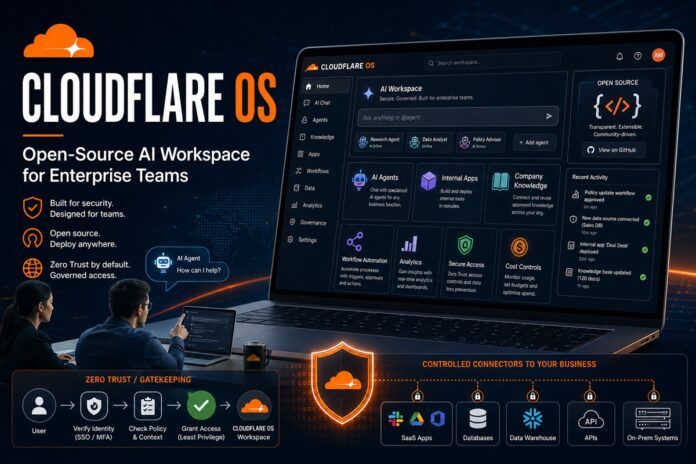
Cloudflare OS: Open-source AI workspace for teams

Cloudflare has launched Cloudflare OS, an open-source artificial intelligence workspace designed to help employees use AI agents, automate repetitive tasks, access authorized company data, and build internal applications from a web browser.

Unlike general-purpose AI assistants that know little about an organization’s internal processes, Cloudflare OS is designed around the terminology, systems, policies and working methods of the company deploying it. The platform allows organizations to provide employees with AI tools that understand company context while maintaining centralized security, governance and cost controls.

Cloudflare OS is available immediately as open-source software that organizations can deploy inside their own Cloudflare accounts. The company is also developing a fully managed version that will be accessible through the Cloudflare dashboard.

An AI Workspace Built Around Company Knowledge

Most workplace AI tools begin each conversation without understanding the organization using them. Employees may have to repeatedly explain internal terminology, procedures, approval requirements, and business context before the AI can complete a useful task.

Cloudflare OS takes a different approach. Companies can create a shared library of organisational context and reusable skills that agents can reference when performing work.

This could include instructions for preparing a sales report, reviewing a contract, responding to a customer issue, analysing operational data or following an internal approval process. Once a team documents the preferred method for completing a task, other employees can reuse that knowledge instead of creating new prompts and processes from scratch.

The platform begins with a browser-based conversation similar to other AI assistants. However, each workspace can include persistent files, connected resources, company-approved instructions and an isolated runtime in which agents can write and execute code.

Employees do not need to be developers or use a command-line interface to access the platform. They can ask an agent to conduct research, prepare documents, analyse live company data, build presentations or automate multi-step workflows from their browsers.

Developed Initially for Cloudflare Employees

Cloudflare OS was originally created as an internal platform for Cloudflare’s workforce.

“Cloudflare OS is how we run Cloudflare. For AI to truly transform an enterprise, it can’t live in a silo or behind a developer bottleneck. Every employee needs the ability to build, iterate, and automate safely,”

said Matthew Prince, co-founder and CEO of Cloudflare.

“We built this because nothing else did what we needed. Now any company can start from where it took us years to get.”

The company says it gave every employee access to the first version in May 2026. Thousands of employees across engineering and non-technical departments now use the system to create documents and presentations, automate repeatable tasks, research topics and build small applications for their daily work.

Cloudflare rebuilt the platform after identifying limitations in its first internal version. Early workspaces were primarily private, applications were mostly static and some predictable jobs continued to consume unnecessary AI tokens because users had to rerun agent instructions.

Collaboration also introduced a more serious challenge: controlling which information an agent had accessed and preventing that information from being exposed when an employee shared a workspace, application or AI-generated output.

The redesigned Cloudflare OS therefore combines an employee-facing agent workspace, an application-building platform and a new security framework for governing access to internal systems.

Employees Can Turn AI Outputs into Applications

Cloudflare OS is not limited to generating text or answering questions. Employees can turn conversations and outputs into working internal applications.

An employee could, for example, ask the workspace to create a dashboard that tracks project issues, an application for reviewing customer requests or a tool that visualises information from an approved company database.

Each application can include a browser interface, server-side code, an API and its own persistent database. Applications are private by default but can be shared with colleagues in a similar way to sharing a document.

Employees can share either the working application or a blueprint that allows another user to create an independent copy. A copied application receives its own data and connected resources rather than inheriting the original creator’s credentials, conversation history or stored information.

Because the applications remain editable, colleagues can ask AI agents to modify them without submitting a traditional software-development request. Cloudflare believes this model could allow employees to create smaller, highly specialized workplace tools without depending entirely on central engineering teams.

Support for Agents and Deterministic Workflows

Cloudflare OS can also convert recurring tasks into automated workflows.

Not every job requires an AI model to make every decision. Some business processes consist mainly of predictable steps, with AI needed only for specific activities that require interpretation or judgment.

The platform can combine conventional code for predictable actions with AI models for the parts that benefit from generative intelligence. Workflows can run manually, according to a schedule or when an event occurs in a connected business system.

This approach could help organisations reduce model usage and improve reliability by avoiding unnecessary AI inference for tasks that ordinary software can complete more efficiently.

Cloudflare OS also supports existing Model Context Protocol (MCP) servers via Cloudflare’s MCP Server Portals, allowing companies to connect approved tools and services already exposed via MCP.

Zero Trust Security and Gatekeepers

Security and governance are central to Cloudflare OS.

Access to the workspace is controlled through Cloudflare Access. Once inside the platform, every new agent and application begins without permission to access company resources.

Agents can request access to a specific resource, but the organisation determines whether that request should be approved. Credentials remain isolated from the agent and from any code the agent generates.

Cloudflare OS also limits network access. Server-side code runs in an isolated Cloudflare Worker without unrestricted outbound Internet connectivity, while browser-based code runs inside a sandbox. Connections to external services must be provided through explicitly approved capabilities.

A major part of this security system is a component Cloudflare calls a Gatekeeper.

Gatekeepers sit between Cloudflare OS and external services such as code repositories, databases or business applications. Instead of giving an agent broad access to an entire service, an administrator can restrict it to particular resources and actions.

For example, an agent could receive permission to read issues from one GitHub repository without being allowed to view the source code. A Gatekeeper could also hide sensitive fields, impose rate limits or require human approval before an action such as merging a pull request is completed.

Gatekeepers handle credentials, enforce access policies, record the resources an agent reads and mediate actions that could affect external systems.

Access Policies Follow the Data

Cloudflare OS also attempts to solve a difficult enterprise AI problem: controlling what happens after an agent has accessed sensitive information.

Restricting the first request is not always enough. An authorised employee might ask an agent to read a confidential database and produce a dashboard. Sharing that dashboard could unintentionally expose the underlying information to colleagues who were not authorised to access the original database.

To address this risk, Cloudflare OS keeps a record of the resources an agent has observed. That record remains attached to the workspace and its outputs.

When another person attempts to access the workspace, application or generated content, Gatekeepers can check whether the person also has permission to view the underlying resources. Information previously accessed by an agent can also affect whether the agent is permitted to send data externally, invite collaborators or transfer work to another agent.

Companies Can Choose Their AI Models

Cloudflare OS does not require organisations to use a single AI model provider.

Every model request passes through Cloudflare AI Gateway, giving administrators a central location for deciding which models employees and applications can use.

Companies could reserve more capable and expensive models for complex work while routing routine tasks to smaller, cheaper alternatives. This may help reduce the cost of deploying AI across a large workforce.

Administrators can attribute AI spending to individual employees, teams, applications, or workspaces. They can also establish budgets, impose rate limits, and determine what should happen when a spending threshold is reached.

You may also be interested in Cloudflare Wallets.

Open-Source Deployment and Implementation Partners

Cloudflare has released both the core Cloudflare OS repository and an example deployment based on its internal implementation.

Organisations can install the platform in their Cloudflare accounts and configure it with their own Cloudflare Access policies, AI Gateway settings, interfaces, data and integrations. Because the software is open source, companies retain greater control over the applications, skills and connections they build rather than tying them entirely to a closed workplace AI vendor.

Cloudflare is also working with implementation partners, including Presidio and Happy Cog, to help enterprises customise the platform. Partners can assist with connecting internal systems, creating organisation-specific interfaces, documenting shared skills and configuring security, compliance and cost controls.

Availability and Future Plans

Cloudflare OS is currently available through Cloudflare’s open-source GitHub repository. Organisations can explore the code, test a demonstration or deploy the starter version into their own Cloudflare accounts.

A managed Cloudflare OS product is expected to arrive through the Cloudflare dashboard. Cloudflare is also working on container support for development workflows and plans to bring Cloudflare OS workspaces into Slack and other workplace chat platforms.

The launch places Cloudflare more directly in the growing enterprise AI workspace market. However, rather than competing only as another workplace chatbot, the company is positioning Cloudflare OS as infrastructure through which organisations can give employees AI agents, application-building capabilities and governed access to internal systems.

Its open-source model, support for multiple AI providers, and emphasis on Zero Trust controls could make it particularly attractive to companies concerned about vendor lock-in, uncontrolled AI spending, and employees exposing sensitive business information through unapproved AI tools.

Read Cloudflare’s full announcement in this blog post.

Also see Why Cloudflare Is Betting on AI Agent Payments Now, And What It Means for the Bot-Driven Web.

Cloudflare Wallets Launches: A Programmable Payment System for AI Agents

0
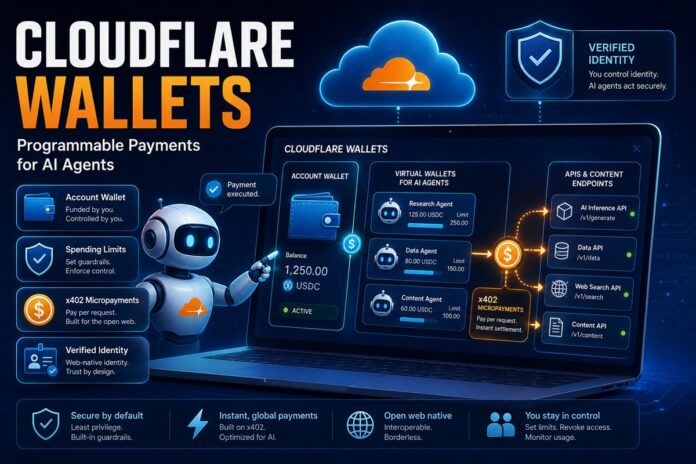
Cloudflare Wallets: AI payment system with virtual wallets

Cloudflare has launched Cloudflare Wallets, a programmable payment and identity system built specifically for AI agents on what the company calls the “agentic Internet.” Announced on August 4, 2026, the product lets AI agents pay for APIs and content on their own, within spending limits that humans set and control.

Right now, you can claim a Cloudflare Wallet handle for your account. The handle gives you a unique username for connecting with merchants. The ability to actually set up a wallet and pay for APIs and content is coming soon.

Here’s what launched, how it works, and why it matters for the future of agentic commerce.

What Are Cloudflare Wallets?

Cloudflare Wallets is a system that gives AI agents two things they have never reliably had: a native way to pay for services, and a stable identity on the web.

Today, when an AI agent tries to use a new API, it usually hits a wall. It has to navigate a login page designed for humans, ask a person to add a payment method, generate an API key, and then work out how to call the service. Agents frequently give up and hand the whole job back to a human, which slows down the growth of agentic commerce and makes it hard for agents to compare many services.

Cloudflare Wallets is designed to remove that friction. With a wallet, an agent can store stablecoins, purchase services, and receive funds across the web without a human stepping in for every transaction.

How Cloudflare Wallets Work: Account Wallets vs Virtual Wallets

There are two types of Cloudflare Wallets, and the split between them is the core of how the system stays safe.

Account Wallets are built for humans who own and use Cloudflare accounts. As the account owner, you can add funds, delegate spending to agents, and remove funds whenever you need to.

Virtual Wallets are built for agents and run on API keys. An agent spends from its Virtual Wallet according to the permissions it has been given, and its maximum spend is capped by a limit the Account Wallet owner sets.

This lets an agent act on your behalf without asking for approval on every purchase, while making it impossible for the agent to overspend your account.

You can define guardrails for each Virtual Wallet, including an allowance, an allow list of approved merchants, and a maximum transaction size. Those guardrails are what let you turn an agent loose to explore dozens or hundreds of APIs without worrying about a runaway bill.

The x402 Protocol Behind the Payments

Cloudflare Wallets is built on the x402 protocol, an open standard that attaches payments directly to HTTP requests. This is what makes agent micropayments possible: an agent can pay a few cents to try an API without creating an account first.

The wallets connect to Cloudflare’s Monetization Gateway, announced earlier in the same month, which lets Cloudflare customers get paid for their websites, APIs, and content.

Monetization Gateway is the “sell” side; Wallets is the “buy” side. Together, they form a two-sided, machine-native marketplace where agents pay for anything from AI inference to data to content using stablecoin micropayments.

If you want to pay or get paid through Monetization Gateway or other x402-compatible endpoints, you’ll need a wallet.

Safe Spending: Why Limits Give Agents More Freedom

Cloudflare frames spending caps as freedom rather than restriction, and the logic is worth understanding.

If an agent is responsible for $10, you can worry far less about its spending than if it controls $1,000. And because trying an API through x402 can cost just a few cents, $10 is more than enough for an agent to test and compare many options. The tight limit is exactly what makes it safe to let the agent explore on its own.

The controls scale to teams, too. Want to give every employee a $100-per-week budget for AI inference? You can fund an Account Wallet and create a Virtual Wallet for each employee with that rule built in. If someone hits their limit, they can request a manual override from a human authorized to change the Account Wallet.

The system is designed so you don’t have to monitor spending every day. If something unusual happens, such as unexpectedly fast spending, a human can review it and decide whether to raise the limit, approve a one-time top-up, or let the caps do their job.

Giving AI Agents a Verifiable Identity

Payments are only half of what Cloudflare is building. The other half is identity.

Right now, when an agent arrives at your website, you usually know very little about it, even though it is acting for a real person or organization. That breaks a lot of traditional web business models. It’s easy to offer a free trial or sign-up credit to a human, but hard to offer the same to an anonymous agent, especially when one person can spin up dozens of agents.

Cloudflare solves this by linking wallets to a Cloudflare account through cloudflare.pay. Agents can optionally identify themselves as a delegate of an account. A research agent might live at an address like research.example.cloudflare.pay, letting merchants see that it belongs to a specific organization. Declaring identity is completely optional, and it’s up to each business to decide whether it wants to prioritize dealing with known agents.

Cloudflare compares the approach to how the web treats VPNs: an unidentified user isn’t automatically untrustworthy, but they may need to prove themselves more. The identity layer builds on existing Cloudflare tools like Web Bot Auth, Turnstile, and Bot Management, turning a hard-to-read cryptographic key pair into a human-readable name, much like DNS maps domain names to IP addresses.

Why Cloudflare Wallets Matter

Cloudflare notes that a majority of web traffic is now driven by bots, which is the backdrop for this entire launch. The company is assembling the building blocks for agentic commerce to work end to end: Monetization Gateway so sellers can get paid without traditional payment infrastructure, Wallets so buyers can pay headlessly through agents, and identity so merchants can know who they’re dealing with.

For developers, startups, and businesses experimenting with AI agents, this points toward a near future where agents can independently discover, pay for, and use online services, all within limits their owners define. For anyone building or monetizing APIs and content, it’s an early signal of how machine-to-machine commerce may actually get paid for.

Frequently Asked Questions about Cloudflare Wallets

What is Cloudflare Wallets? Cloudflare Wallets is a programmable payment and identity system for AI agents. It lets agents store stablecoins, pay for APIs and content, and receive funds, all within spending guardrails set by a human account owner.

When did Cloudflare Wallets launch? Cloudflare announced Wallets on August 4, 2026. You can claim a wallet handle at cloudflare.pay right away, while the ability to set up wallets and pay for services is coming soon.

What is the difference between an Account Wallet and a Virtual Wallet? Account Wallets are for humans who own Cloudflare accounts and can add or remove funds and delegate spending. Virtual Wallets are for agents, run on API keys, and can only spend up to a limit set by the Account Wallet owner.

What is the x402 protocol? x402 is an open protocol that attaches payments to HTTP requests, enabling micropayments. It lets an AI agent pay small amounts, often just cents, to use an API without first creating an account.

Do I need a Cloudflare Wallet to use Monetization Gateway? Yes. To pay or get paid through Cloudflare’s Monetization Gateway or other x402-compatible endpoints, you’ll need a wallet.

How do spending limits make using agents safe? Account Wallet owners set guardrails on each Virtual Wallet, including an allowance, an allow list of approved merchants, and a maximum transaction size. These caps let agents explore and test many services autonomously while preventing overspending.

How to Apply for the FG C.L.I.C.K.D. Scheme: Step-by-Step Guide to Getting a Laptop or Smartphone on Credit

0
How to Apply for the FG C.L.I.C.K.D. Scheme

The Federal Government has opened applications for a scheme that lets Nigerians take home a laptop, smartphone or tablet now and pay for it in installments. It is called C.L.I.C.K.D., short for Credit for Laptops, Internet, Connectivity and Knowledge Digital Devices, and the application portal is already live.

If you have ever abandoned a remote job application, a data analytics course or a freelance gig because you could not raise a few hundred thousand naira for a laptop upfront, this is the programme aimed squarely at you.

This guide walks you through exactly how to apply, who qualifies at this stage, what information the form asks for, and, just as importantly, the loan terms that CREDICORP has not yet made public.

Quick facts about C.L.I.C.K.D.

DetailInformation
Full nameCredit for Laptops, Internet, Connectivity and Knowledge Digital Devices
Implementing agencyNigerian Consumer Credit Corporation (CREDICORP)
Supervising ministryFederal Ministry of Communications, Innovation and Digital Economy
Launch dateTuesday, 21 July 2026, Abuja
Launch partner3 Million Technical Talent (3MTT) Programme
Current pilot size1,000 locally assembled laptops
Application portalcredicorp.ng/clickd
Application feeNone
Interest rate / repayment termsNot yet announced

What Is the C.L.I.C.K.D. Scheme?

C.L.I.C.K.D. is CREDICORP’s flagship device financing initiative. Rather than handing out free gadgets, it extends structured consumer credit so that working Nigerians can buy productivity devices and spread the cost over time.

The FG programme was unveiled at the Afreximbank African Trade Centre in Abuja on 21 July 2026, in partnership with the Federal Ministry of Communications, Innovation and Digital Economy. The Minister, Dr Bosun Tijani, chaired the launch as Chief Launcher, while CREDICORP’s Managing Director and CEO, Engr. Uzoma Nwagba, presented the scheme’s design and first-phase targets.

Nwagba framed the initiative as one that “transforms digital devices from a barrier into an opportunity”, noting that embedding credit inside a national talent pipeline like 3MTT gives qualifying Nigerians a responsible route to the tools they need to learn and earn.

Tijani, for his part, tied it to the broader industrial agenda, arguing that Nigeria’s digital economy thrives only when citizens have both the skills and the tools to succeed with locally assembled devices, thereby strengthening domestic manufacturing.

The devices covered by the programme include:

  • Laptops
  • Smartphones
  • Tablets
  • Connectivity devices (routers, MiFi and similar internet hardware)
  • Digital learning equipment

The first phase is delivered with Fidelity Bank as the credit administration partner, and NASENI and Imose Technologies as device manufacturers. CREDICORP has also said it intends to bring in more participating financial institutions, device makers, and technology vendors, and to keep working with the Central Bank of Nigeria as the scheme scales.

Who Can Apply for C.L.I.C.K.D. Right Now?

This is where most of the confusion sits, so it is worth being precise.

Officially confirmed for the current pilot: fellows of the Federal Government’s 3 Million Technical Talent (3MTT) Programme. The pilot covers 1,000 locally assembled laptops. Distribution began in Abuja, where 77 beneficiaries collected their devices at the launch ceremony, and the remaining units are being released to qualified fellows in other states in phases.

Listed on the application form, but not yet formally confirmed: the portal also asks applicants to indicate membership of other digital talent programmes, including:

  • Andela Learning Community
  • Learn2Earn
  • ALX Africa
  • HNG Internship
  • AltSchool Africa
  • Genesys Tech Hub
  • “Other”

CREDICORP has not publicly confirmed that members of these programmes are eligible for the current 1,000-laptop batch. Their presence on the form suggests they are being mapped for later phases.

Everyone else: the form is open to all. You can select your state from all 36 states and the FCT, and describe yourself as a salary earner, freelancer or self-employed person, business owner, student, job seeker or NYSC member. CREDICORP has described C.L.I.C.K.D. as open to working Nigerians nationwide, with 3MTT simply serving as the launch partner for phase one.

In practice: if you are not a 3MTT fellow, submitting now is best understood as registering an expression of interest for when the programme widens. That is not a wasted exercise CREDICORP’s main consumer credit scheme launched in April 2024 targeting federal civil servants before broadening, so the phased pattern is well established.

What You Need Before You Start

The application is short and fully online. There are no document uploads at the expression-of-interest stage, but have the following ready:

  • Your state of residence
  • Your employment status
  • Your monthly income band (optional, but recommended — see the tips section below)
  • Your digital talent programme, if you belong to one
  • A clear idea of which device you need and why
  • A working phone number and email address you actually check

Verification documents such as your NIN and BVN come into play at the credit assessment stage, once CREDICORP and its financial partners follow up. Have those details accessible, but you will not be asked to upload them on the first form.

How to Apply for C.L.I.C.K.D.: Step-by-Step

Step 1: Go to the official portal

Visit credicorp.ng/clickd. This is the official C.L.I.C.K.D. landing page. Do not use any third-party site, WhatsApp link, or “agent” claiming to process applications on your behalf.

Step 2: Click “I’m Interested”

The button appears on the hero section of the page and again further down. Click the button to open the application form at credicorp.ng/clickd/apply.

Step 3: Enter your First Name and Surname

The first item to fill in the form is your first name and surname. Make sure the details you enter in the fields provided match what is on your government documents, like NIN and BVN, to avoid identity issues.

Step 4: Enter your EMail Address

Enter an active email address so you can easily be reached with updates about the program and your eligibility or otherwise.

Step 5: Enter your Phone Number

Enter your phone number. Note that you may be reached through the phone number, so make sure it your active line.

Step 6: Select your state of residence

A dropdown covering all 36 states and the Federal Capital Territory. This helps CREDICORP plan the phased rollout across the country, so answer accurately rather than picking Abuja or Lagos in the hope of faster service.

Step 7: Select Resident Local Government Area

After selecting the state, you now pick your local government of residence in a dropdown. We believe this will also help CREDICORP plan the phased rollout across the country.

Step 8: Choose what best describes you

Your options are:

  • Employed (Salary Earner)
  • Freelancer / Self-Employed
  • Business Owner
  • Student
  • Job Seeker
  • NYSC Member

Step 9: Indicate your monthly income (optional)

The bands run from below ₦100,000 to above ₦1,000,000. It is marked as optional, but a credit programme needs to assess repayment capacity; leaving it blank gives the assessors nothing to work with.

Step 10: Select your digital talent programme

Choose from 3MTT, Andela Learning Community, Learn2Earn, ALX Africa, HNG Internship, AltSchool Africa, Genesys Tech Hub, or “Other”. If you are a 3MTT fellow, this is the single most important field on the form for the current phase.

Step 11: Choose the device you need

Laptop, smartphone, tablet, or other. Note that the pilot is supplying locally assembled laptops specifically, so laptop applicants are likely the ones being served first.

Step 12: State why you need the device

You can select multiple reasons, including:

  • Learning and certifications
  • School
  • Work or Remote work
  • Freelancing
  • Business growth
  • Software development
  • Content creation
  • Other

Step 13: Tell them how you heard about C.L.I.C.K.D.

Options include 3MTT, social media, a friend or family member, school, your employer, Google search, or other.

Step 14: Tick the three consent boxes

Before you can submit, you must confirm that the information you provided is accurate, agree to be contacted about your application, and consent to CREDICORP and its partners using your information to assess your eligibility.

Step 15: Submit

That is the whole process. It takes a few minutes.

You can also be interested in the Best Laptops for Programming.

What Happens After You Submit?

Submitting the form is an expression of interest, not an approval. CREDICORP and its partner, Fidelity Bank, handle credit administration for the first phase and will assess eligibility and contact successful applicants.

Because the current batch is capped at 1,000 laptops and is being released state by state, applicants outside the confirmed 3MTT pool should expect to wait for a later phase rather than an immediate callback.

Keep the phone number and email you supplied active. Legitimate follow-up will come from CREDICORP or a named participating financial institution.

The Details CREDICORP Has Not Released Yet

As of the time of writing, CREDICORP has not published:

  • The interest rate on C.L.I.C.K.D. device loans
  • The repayment tenure
  • The monthly repayment amount
  • Whether a down payment is required before you collect a device

These are the four numbers that determine whether the scheme is genuinely affordable for you, and they are expected to be disclosed as the programme scales beyond the pilot.

For context on what “affordable” might look like: when CREDICORP’s broader consumer credit scheme rolled out, reporting at the time indicated rates in the region of 20 to 22 percent annually through participating institutions, dramatically below the effective annual rates charged by Nigeria’s digital lending apps, which routinely run into triple digits.

That figure relates to the wider scheme rather than to C.L.I.C.K.D. specifically, so treat it as a rough reference point and not a quoted rate.

Our advice: submit your expression of interest now, but do not sign any credit agreement until you have seen the rate, the tenure, and the total cost of the device in writing.

C.L.I.C.K.D. vs Buying Outright vs Loan Apps

A decent entry-level laptop suitable for software development or data work generally starts around ₦450,000 to ₦700,000 from established retailers like Jumia, Slot, or Pointek, and midrange machines climb well past ₦1 million. For someone earning under ₦200,000 a month, saving that up while also paying rent and transport is a multi-year project.

The three realistic routes:

Buying outright costs the least overall but requires capital you may not have, and every month you wait is a month of income you are not earning with the device.

Loan apps and BNPL platforms are fast and accessible, but the effective annual cost is punishing, and some have poor records on debt-recovery conduct.

C.L.I.C.K.D. sits between the two: a government-backed structure with a licensed bank administering credit, aimed at being cheaper than commercial digital lending. Its added advantage is that every successful repayment builds your formal credit history, which matters if you ever want a mortgage, a car loan, or business financing later.

The catch is that the terms are unpublished and the current supply is 1,000 units.

Tips to Strengthen Your Application

  1. Fill in the income field. Skipping it removes the main data point an assessor would use to size a repayment plan for you.
  2. Be specific about purpose. “Software development” and “remote work” align directly with the programme’s stated goal of turning skills into income.
  3. Answer the talent programme question honestly. Falsely claiming 3MTT membership is easily checked against the programme’s records and will sink your application.
  4. Use contact details you monitor. A missed call or an email in spam is how people lose their slot in a capped pilot.
  5. Apply early in each phase. With 1,000 units spread nationwide, timing matters.

Also see Best Android Phones, Cheap Android Phones, and iPhones.

Watch Out for C.L.I.C.K.D. Scams

Any government scheme this popular attracts fraud within days. Protect yourself:

  • The only legitimate application URL is credicorp.ng/clickd. Check the spelling carefully.
  • There is no application fee. Nobody legitimate will ask you to pay to apply, to “process” your file, or to “secure” a device.
  • CREDICORP will never ask for your BVN, bank PIN, card details or OTP over WhatsApp, Telegram or phone.
  • Ignore Telegram groups, Facebook pages and “agents” offering guaranteed approval.
  • Cross-check announcements against CREDICORP’s official channels before acting.

Frequently Asked Questions

Is C.L.I.C.K.D. a free laptop scheme? No. It is a credit programme. You receive the device without paying the full cost upfront, then repay in structured installments.

Can I apply if I am not a 3MTT fellow? Yes, the form is open to everyone. However, the confirmed beneficiaries of the current 1,000-laptop pilot are 3MTT fellows. Non-fellows are effectively registering interest for future phases.

What does C.L.I.C.K.D. stand for? Credit for Laptops, Internet, Connectivity and Knowledge Digital Devices.

How much is the interest rate? CREDICORP has not announced the interest rate, repayment period or down-payment structure yet. These details are expected as the programme expands.

Can I choose my own laptop model? The pilot supplies locally assembled laptops produced by NASENI and Imose Technologies. Broader device choice is expected as more manufacturers and vendors join.

Does applying affect my credit score? Submitting the expression-of-interest form does not. Taking and repaying an approved loan does positively, if you repay on schedule.

Is there an application deadline? No deadline has been announced. The portal is live and accepting applications.

Can students and NYSC members apply? Yes. Both are listed as options in the employment status field.

Conclusion

C.L.I.C.K.D. is one of the more sensibly designed federal tech interventions in recent memory. It attacks a real bottleneck: device access through credit rather than giveaways, routes demand toward locally assembled hardware, and builds credit histories for young Nigerians who have none.

The reservations are equally real. A thousand laptops is a rounding error against 3MTT’s ambitions, let alone the wider working population, and launching applications before publishing interest rates and repayment terms leaves applicants unable to judge affordability.

The sensible move is to register your interest at credicorp.ng/clickd now, and hold off on any commitment until the numbers are public. We will update this guide as CREDICORP releases the loan terms.

Read: Best Laptops for Business and Personal Use.

Netchex Launches Mesh: Six AI HR “Teammates” That Do the Work Before You Ask

0
Mesh AI Teammates

Netchex has launched Mesh, a team of six AI HR “teammates” built to handle payroll, compliance, scheduling, and everyday HR work before anyone has to ask. Announced on July 20, 2026, from the company’s Covington, Louisiana, headquarters, Mesh is aimed squarely at the deskless workforce in restaurants, hotels, dealerships, and healthcare practices where most staff never sit in front of a computer.

It is a pointed move in a market crowded with AI that mostly waits to be asked a question. Netchex’s pitch is the opposite. Mesh watches the data, spots the problem, and gets the work moving on its own, with humans stepping in only to approve the decisions that matter.

What is Netchex Mesh?

Mesh is a set of AI HR agents embedded in the Netchex payroll and human capital management (HCM) platform. Rather than functioning as a single chatbot, it is structured as a team of six specialists that continuously monitor payroll, scheduling, time, and HR data, with each one owning a complete workflow from start to finish.

The core idea is that these agents anticipate problems and complete work before staff flags it, a step beyond the ask-and-answer chatbots that define most AI in HR today.

As Saurabh Nangia, Chief Product Officer of Netchex and founder of Mesh.ai, put it, most AI so far mostly just answers questions when asked, while Mesh is designed to get ahead of the work and handle the tasks people dislike doing.

Mesh builds on Netchex’s acquisition of Mesh.ai, a Y Combinator–backed, AI-first performance and engagement platform. After the acquisition, the Mesh.ai team set out to scale the technology across every workflow an HR team touches, and built the AI teammates announced at launch.

Meet the six AI HR teammates

The founding roster is made up of six named agents, each handling a distinct slice of HR operations:

  • Penny — a payroll assistant that chases missing timecards and flags payroll issues.
  • Atlas — a people ops coordinator that connects onboarding, status changes, documents, and approvals.
  • Sentinel — a compliance and risk analyst that watches for patterns and gaps teams don’t have time to catch.
  • Nova — a workforce analyst that turns scattered data into signals managers can act on.
  • Milo — an employee concierge that files PTO, arranges shift coverage, pulls pay stubs, and answers policy questions instantly.
  • Nettie — a service partner that troubleshoots issues and answers product questions for admins, drawing on Netchex’s knowledge articles and training resources.

Netchex has described these six as the founding roster and says it plans to add more teammates over time.

Why Mesh targets the deskless workforce

Most HR software is built for the corporate office, but that is not where a huge share of the real economy actually works.

In a restaurant group, a hotel, a dealership, or a healthcare practice, roughly 80% of employees never sit at a desk. Shift swaps happen over group texts, timecards come in late, and the HR teams behind these operations tend to be lean and stretched thin often a single admin running payroll, approving timecards, fielding PTO requests, and onboarding new hires, all before lunch.

Netchex’s argument is that because Mesh sees across pay, scheduling, time, and HR in one platform, it can connect dots that fragmented tools miss. The company gives two examples: flagging a scheduling pattern that is quietly turning a strong employee into a flight risk, and catching expiring technician certifications weeks before they open up a staffing gap.

You may also be interested in Best HR Management Software for HR Managers.

Mesh works inside ChatGPT and Claude

One of the more notable details is where Mesh operates. Beyond the Netchex platform itself, employees can file PTO, swap shifts, and check pay stubs directly inside ChatGPT or Claude.

Managers can spot overtime trends and approve requests, and admins can run payroll audits and pull headcount reports without opening Netchex at all. Netchex says nothing sensitive is submitted without human approval.

That approach, meeting workers inside the AI assistants they may already be using, reflects a broader shift in how workplace software is being delivered, moving the point of interaction to where people already are rather than forcing them into yet another dashboard.

Early results and the wider AI agent trend

Netchex says customers in its early access program have won back roughly half of their Monday admin time and seen a double-digit drop in payroll corrections. The company describes these as directional results from early access rather than audited benchmarks, so they should be read as early indicators rather than guaranteed outcomes.

The launch lands amid a broader industry push toward task-specific AI agents. Netchex points to a Gartner projection that 40% of enterprise applications will feature task-specific AI agents by 2026, up from less than 5% in 2025 a signal that the “agentic” approach Mesh represents is moving quickly from novelty to expectation.

“Our mission has always been to build the best software and support for deskless industries,”

said Abhinav Agrawal, CEO of Netchex, framing AI teammates as a way to give smaller operators the kind of bench strength usually reserved for far larger companies.

What it means for businesses

For lean HR teams, the appeal of a tool like Mesh is straightforward: less time lost to routine prep and error-chasing, and more attention freed up for the work that actually needs a human.

The proactive, agent-based model is also part of a larger trend that businesses everywhere, including across emerging markets in Asia, Africa, and Nigeria, where frontline and deskless labor dominates many sectors and HR functions are often small and overstretched, will be watching closely as it matures.

For now, Mesh is a US-focused rollout beginning with early access, and the headline efficiency figures come from Netchex’s own early data. But as a marker of where HR software is heading, from tools that answer questions to agents that quietly do the work, it is a launch worth paying attention to.

Mesh is rolling out to Netchex customers, starting with early access. Businesses can meet the AI teammates or request a demo at netchex.com/mesh.

Also Read: Best Payroll Software for Small Business.