
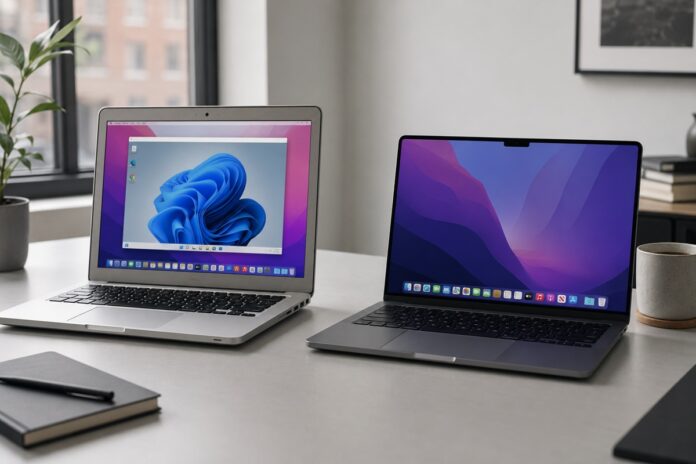

Parallels Desktop 27 is here, but for many Mac users, the biggest news isn’t a new feature; it’s a line that’s finally been drawn. Version 27 runs exclusively on Apple Silicon Macs. If your Mac still has an Intel processor, you can’t upgrade to it.
That change doesn’t stand alone. It arrives in the same season as macOS 27 “Golden Gate,” Apple’s first desktop release that completely leaves Intel Macs behind. Together, the two mark the effective end of the Intel Mac era. Here’s exactly what that means if you rely on your Mac to run Windows and what you should do about it.
Related: Parallels Desktop 27 Standard vs Pro: Which to Buy?
What actually changed in Parallels Desktop 27
Parallels Desktop 27 is available only for Apple Silicon Macs, the M1 through M5 generations. There is no Intel build.
If you’re on an Intel Mac, the situation is straightforward: Parallels Desktop 26 is the last version that supports your hardware.
It doesn’t stop working the day Desktop 27 ships, and you can keep running your existing Windows virtual machines on it. But you won’t receive the version 27 feature set, and over time you should expect version 26 to move toward the end of its support lifecycle.
Parallels maintains a knowledge base article with the current lifecycle details, which is worth bookmarking if you’re staying on Intel for now.
Why this was expected: macOS 27 also leaves Intel behind
The Parallels cutoff mirrors a much bigger one from Apple. macOS 27 Golden Gate is the first version of macOS that will not install on any Intel Mac; it requires an Apple Silicon chip (M1 or later).
This isn’t a surprise. Apple signaled back at WWDC 2025 that macOS 26 Tahoe would be the final release compatible with Intel-based Macs, and Golden Gate is that transition reaching completion rather than a sudden reversal. In practical terms, an Intel Mac tops out at macOS 26 Tahoe, and a Mac that can’t move past Tahoe also can’t run the Parallels release built for the newest macOS.
Your Intel Mac still works
None of this bricks your machine. An Intel Mac running macOS 26 Tahoe and Parallels Desktop 26 remains a fully functional way to run Windows on a Mac today.
Apple has also confirmed that Intel Macs will continue to receive security updates for roughly three years after their final supported macOS release. So you won’t be left exposed the moment Golden Gate ships; you’ll have a defined runway.

What you won’t get are new macOS features, the newest Apple Intelligence capabilities, and the performance and graphics improvements Parallels is now reserving for Apple Silicon.
The other deadline: Rosetta 2 and Intel apps
There’s a second, easily confused deadline that even Apple Silicon owners should note. macOS 27 Golden Gate is the last version of macOS to fully support Rosetta 2, the translation layer that lets Intel-built apps run on Apple Silicon Macs.
When macOS 28 arrives next year, that full support goes away (Apple plans to keep only a narrow slice of Rosetta for certain older games). Any app that still hasn’t shipped a native Apple Silicon version could stop working then.
That matters most for people leaning on old plug-ins, hardware utilities, printer drivers, or specialist scientific and creative tools. The hardware transition and the Intel-app transition are related but not the same deadline; one is about which Mac you own, the other about how your apps were built.
What Intel Mac owners running Windows should do now
If you use Parallels to run Windows software, a simple plan covers most situations:
- Short term, you’re fine: Stay on Parallels Desktop 26 and macOS 26 Tahoe. Your Windows VMs keep running, and security updates continue for a few years.
- Take inventory: List the Windows apps and any Intel-only Mac apps you genuinely can’t replace. That list tells you how urgent a move really is.
- Plan the Apple Silicon move deliberately, not in a panic: Base the timing on the work you actually do, not on fear. When you do move, an Apple Silicon Mac lets you jump straight to the current Parallels release.
- Back up your VMs before any major change: Standard advice, but worth repeating before an OS or hardware migration.
The upside of moving to Apple Silicon
The reason Parallels is concentrating on Apple Silicon is that the platform is where the meaningful gains now live. Moving to an M-series Mac and Parallels Desktop 27 unlocks a Metal-based OpenGL 4.3 graphics driver for demanding Windows apps, full macOS 27 Golden Gate support, and, on M4 chips and newer, accelerated local AI and machine-learning work inside Linux virtual machines. For anyone with a graphics-heavy or AI-related Windows workload, that’s a genuine step up from what an Intel Mac can offer.
The Intel Mac served its purpose well. But between Apple ending Intel support in macOS and Parallels following suit, the direction is now unambiguous, and the good news is that you can make the move on your own timeline rather than overnight.
Frequently asked questions about Parallels Desktop 27
Does Parallels Desktop 27 work on Intel Macs? No. Parallels Desktop 27 is exclusively for Apple Silicon Macs (M1 through M5). Intel Mac users should stay on Parallels Desktop 26, the last version to support Intel hardware.
Can I still run Windows on my Intel Mac? Yes. Parallels Desktop 26 on macOS 26 Tahoe remains a fully working way to run Windows on an Intel Mac. You simply won’t get the version 27 features.
Can Intel Macs run macOS 27 Golden Gate? No. macOS 27 Golden Gate is the first macOS release limited to Apple Silicon Macs (M1 or newer). The last macOS version for Intel Macs is macOS 26 Tahoe.
How long will my Intel Mac keep getting updates? Apple has said Intel Macs will continue to receive security updates for about three years after their final supported macOS release, though not new feature updates.
What is happening with Rosetta 2? macOS 27 Golden Gate is the last version with full Rosetta 2 support. From macOS 28 onward, Intel-built apps that haven’t been updated for Apple Silicon may stop working, aside from a limited carve-out for some older games.
You may also be interested in: Parallels Desktop 27 launched with OpenGL 4.3, Faster On-Device AI, and Full macOS 27 Support.